Efficient LLMs Fine-Tuning: Optimizing LLMs on a Single GPU.
Optimize LLMs on a single GPU: fine-tuning tips, GPU recommendations, benefits, and solutions for efficient, cost-effective AI model deployment.
10/10/2025
Efficient LLMs Fine-Tuning: Optimizing LLMs on a Single GPU.
artificial intelligence
8 min read
The rapid progress and innovation are not just raising the expectation from LLM but also require significant resources to power them. In today's market, where LLMs are being introduced and evolving every day, maintaining global autonomy and securing a top position on the benchmark leaderboard is becoming challenging.
Here, fine-tuning LLMs on a single GPU can allow models to exhibit smooth performance. Fine-tuning LLMs has its own certain pre-requirements in terms of resources and preparation. But once it's implemented, it allows streamlined customization, reduces training costs, and speeds up deployment. Fine-tuning LLM also enables small teams to build domain-specific models and drives faster innovation without needing large compute infrastructure.
With our article, we will explore the depth of Fine-tuning LLMs and their impact. We will help you understand the challenges of not fine-tuning, recommended GPUs for different model sizes, steps to optimize it on a single GPU, and the benefits and limitations. This will help you implement a performing LLM for the specialized business use case.
What is Fine-Tuning of LLMs?
Fine-tuning of LLMs is the process of optimizing pre-trained model weights on a domain-specific basis, by dataset, by utilizing supervised or reinforcement learning. By doing this, the model adapts to performing specialized tasks, with improved accuracy on target data, and can leverage techniques like LoRA or QLoRA for memory-efficient training.
Why Fine-tuning LLMs is Critical?
Fine-tuning LLMs is one of the critical and most essential steps to ensure that they are delivering the expected performance. It assists the model to adapt comfortably to the required duties with enhanced accuracy. Therefore, fine-tuning holds a significant impact. Below, we have listed a few important issues that LLMs face without fine-tuning:
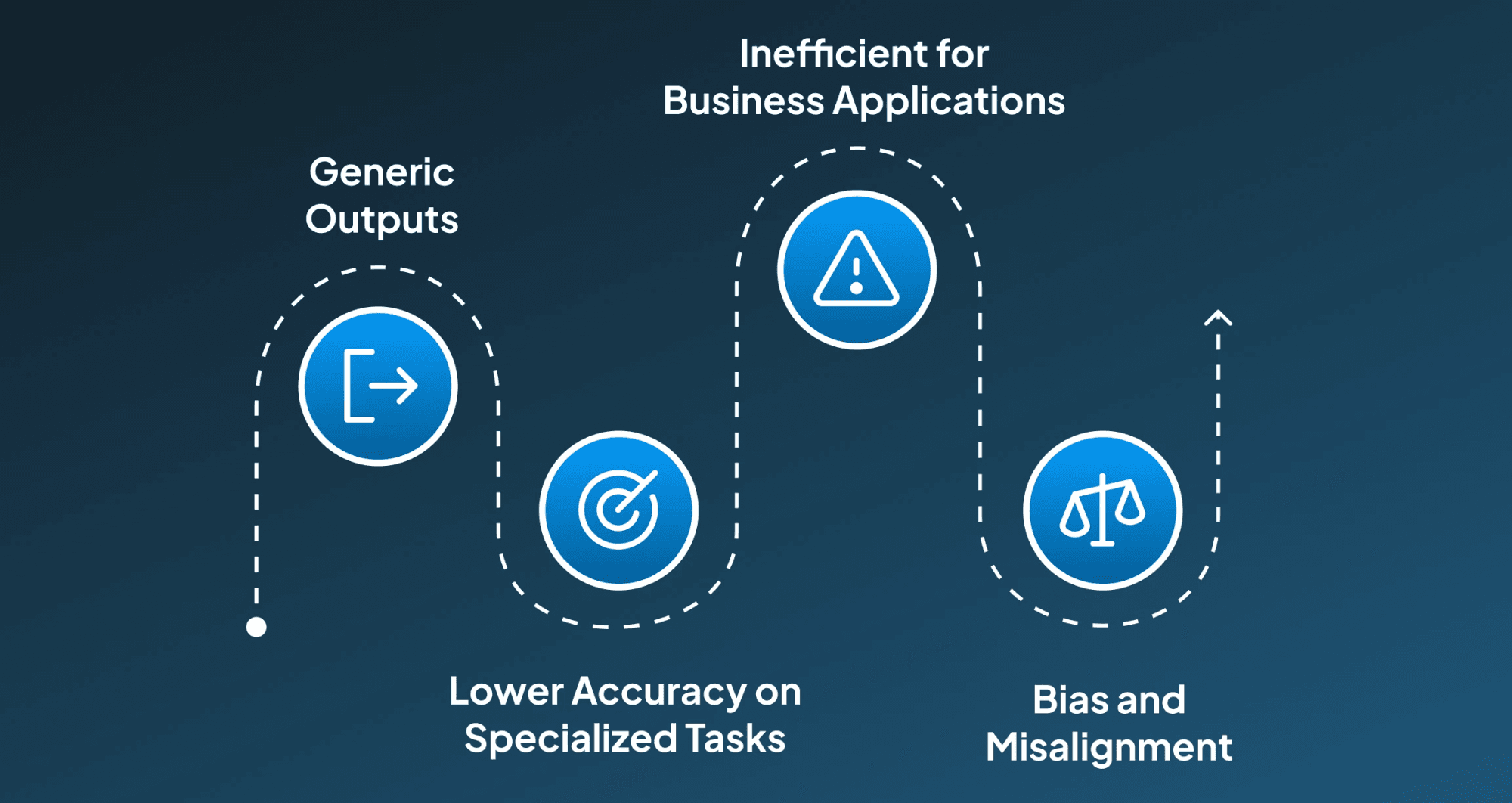
1. Generic Outputs
Pre-trained LLMs tend to produce generic, broad, and generalized responses, which might not match domain-specific requirements for domain-specific tasks.
2. Lower Accuracy on Specialized Tasks
Without fine-tuning, LLMs might misinterpret jargon or context in fields like healthcare, finance, or law, leading to critical inaccuracies.
3. Inefficient for Business Applications
Without fine-tuning, LLMs produce generic responses that aren't adapted to business requirements, ultimately requiring additional post-processing or human correction, which increases operational costs.
4. Bias and Misalignment
Sometimes, the pre-trained LLMs might hold some previous biases in the training data and might have an impact on the results of the environment where they are deployed, eventually failing to align with organizational values or safety standards.
LLM Fine-Tuning: Recommended GPUs and Methods by Model Size
Therefore, fine-tuning is an important step to ensure the model aligns with the required outcomes in terms of performance and execution. Fine-tuning LLMs requires some resources in terms of GPUs, which depend on the model size, in order to meet the expected results. Below, we have mentioned the model size, recommended GPU, and fine-tuning that would work for it:
1. Small Models (1B–3B)
Models that have their parameter size around 1B-3B are categorized as small models. Such models are designed for lightweight tasks, fast inference, and edge-device deployment. They ensure basic reasoning and language understanding with reduced GPU requirements.
1B-3B | Gemma 2B | 8GB | 12–16GB | Full FT, LoRA, QLoRA |
|---|---|---|---|---|
1B-3B | LLaMA 3.3 1B | 8GB | 12–16GB | Full FT, LoRA, QLoRA |
1B-3B | Mistral Nemo 12GB | 8GB | 12–16GB | Full FT, LoRA, QLoRA |
2. Medium Models (7B)
Models having parameters around 7 billion fall under medium models. These models offer improved reasoning and contextual understanding for generalized NLP tasks. Such models can be optimized for single-GPU fine-tuning using methods like QLoRA.
7B | Mistral 7B | 16GB | 24GB | QLoRA, LoRA |
|---|---|---|---|---|
7B | Gemma 7B | 16GB | 24GB | QLoRA, LoRA |
3. Large Models (13B–14B)
Models with 12-14 billion parameters are considered as large models, which exhibit more enhanced contextual understanding and higher accuracy for domain-specific tasks. These large models need moderate to high GPU memory for training or adaptation.
13B-14B | LLaMA 3.2 11B-14B | 24GB | 32–48GB | QLoRA, LoRA |
|---|---|---|---|---|
13B-14B | Qwen 14B | 24GB | 32–48GB | QLoRA, LoRA |
13B-14B | Yi 12B | 24GB | 32–48GB | QLoRA, LoRA |
4. Extra-Large Models (30B–34B)
Models with 30+ billion parameters are considered extra-large. These models are designed for advanced reasoning, deeper context retention, and near-enterprise-level performance. They usually demand high-memory GPUs and rely on LoRA-based fine-tuning.
30B-34B | LLaMA 2 30B-34B | 48GB | 80GB | LoRA |
|---|---|---|---|---|
30B-34B | MPT-30B | 48GB | 80GB | LoRA |
5. Ultra-Large Models (65B–70B)
Models with 65–70 billion parameters are considered ultra-large models. Such models are well known for delivering state-of-the-art reasoning, creativity, and multi-step task performance. Because of their really large size, they require high VRAM or multi-GPU setups and can only be fine-tuned efficiently using LoRA.
65B-70B | LLaMA 3.1B | 80GB | Multi-GPU (2–4× 80GB) | LoRA only |
|---|
Steps to Optimize LLMs on a Single GPU
To ensure the efficient performance of LLMs, it's very important to optimize them on a GPU. This helps in speeding up development and allows small teams to fine-tune powerful models efficiently. Below, we have listed all the steps involved in optimizing the LLMs on a single GPU
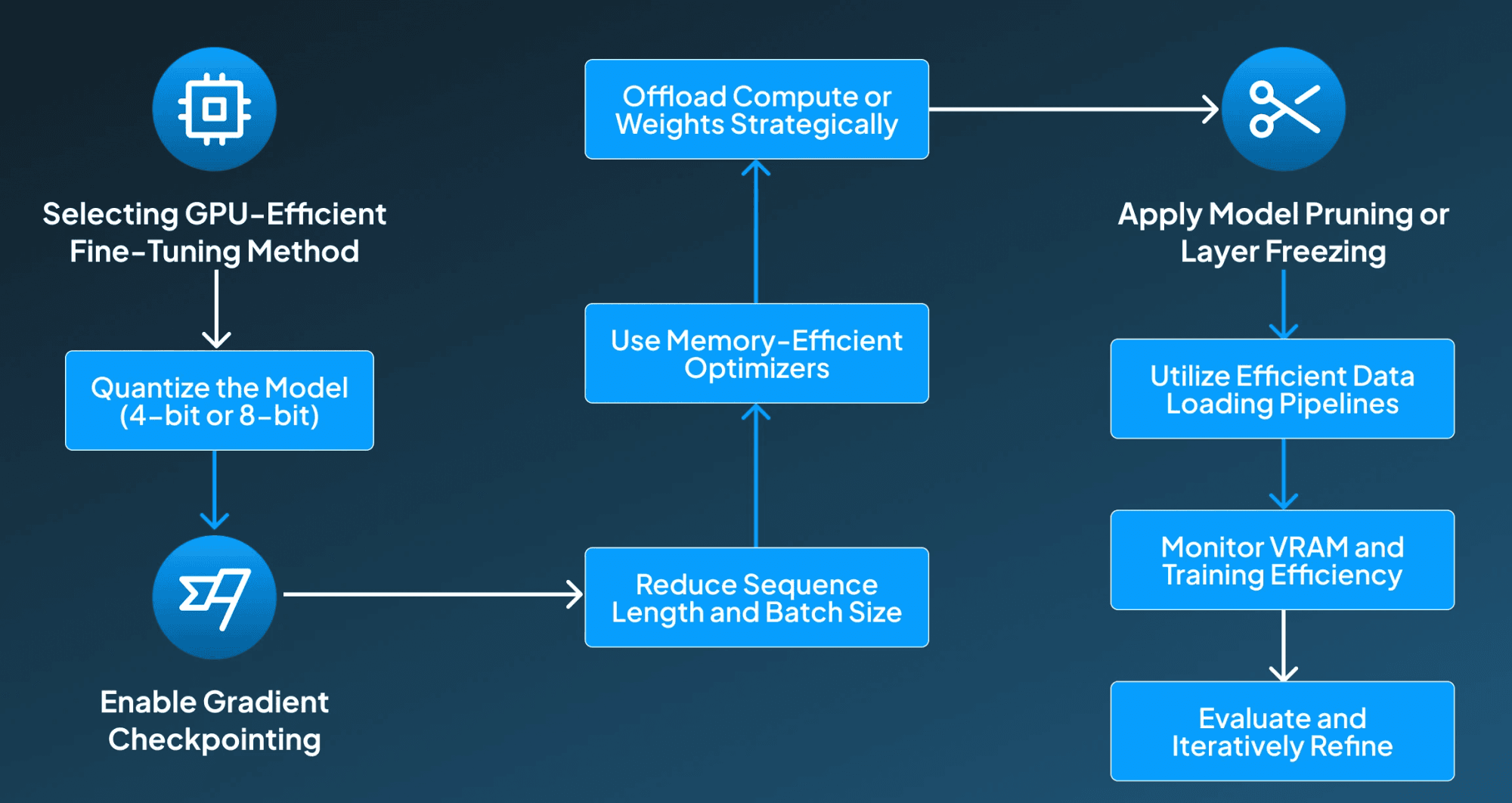
Step 1: Selecting GPU-Efficient Fine-Tuning Method
The first step in the process for ensuring GPU-efficient fine-tuning is selecting the right fine-tuning technique, LoRA, QLoRA, or other PEFT techniques to reduce memory usage by training only adapter layers instead of full model weights.
Step 2: Quantize the Model (4-bit or 8-bit)
After this, the next important step is to apply 4-bit quantisation (NF4) or 8-bit quantization (LLM.int8) to compress model weights. So that it fits larger models into limited VRAM.
Step 3: Enable Gradient Checkpointing
Then, for saving memory, we can store fewer intermediate activations during backpropagation and recompute them on demand.
Step 4: Reduce Sequence Length and Batch Size
By lowering the max sequence length and using gradient accumulation, it simulates larger batch sizes without exceeding VRAM limits.
Step 5: Use Memory-Efficient Optimizers
After this, it's essential to select the optimizers like Paged AdamW or Lion designed for low-memory environments when working with large models.
Step 6: Offload Compute or Weights Strategically
Then, under this step, the compute and weights are offloaded strategically, by using CPU offloading, NVMe offloading (bitsandbytes), or FlashAttention to distribute memory load.
Step 7: Apply Model Pruning or Layer Freezing
After offloading weights, the pruning or layer freezing is applied to freeze lower transformer layers or prune less impactful weights to reduce the number of trainable parameters.
Step 8: Utilize Efficient Data Loading Pipelines
Once the pruning layers are finalized, it's now time to stream data, process batches on the fly, and use num_workers to ensure the GPU is fully utilized without bottlenecks.
Step 9 Monitor VRAM and Training Efficiency
In the last few steps, it's important to track GPU memory usage with tools like nvidia-smi, adjust hyperparameters to avoid the occurrence of OOM errors.
Step 10: Evaluate and Iteratively Refine
In the final step, run validation steps, measure perplexity, and fine-tune hyperparameters to ensure stable performance under VRAM constraints.
Benefits of Optimizing LLMs on a Single GPU
Optimizing LLMs on a single GPU offers significant advantages, enabling cost-effective, accessible, and efficient fine-tuning. It accelerates experimentation, maximizes GPU memory usage, and allows seamless customization for domain-specific applications. 1. Lower Training and Infrastructure Costs
“Optimizing LLMs for single-GPU training removes the need for expensive multi-GPU clusters, significantly reducing hardware, cloud, and maintenance costs while still enabling effective fine-tuning of mid-sized models.” (Edward J. Hu et al., 2021)
2. Accessibility for Small Teams and Researchers
Single-GPU optimization democratizes LLM development, allowing small teams, students, and independent researchers to fine-tune powerful models using consumer hardware instead of enterprise-level compute resources.
3. Faster Iteration and Experimentation
“A single-GPU workflow simplifies setup, reduces overhead, and accelerates training cycles, enabling quicker testing of new datasets, architectures, and prompts for continuous improvement and rapid prototyping.” (Tim Dettmers et al., 2023)
4. Efficient Use of Limited GPU Memory
“Techniques like quantization, LoRA, and gradient checkpointing maximize VRAM efficiency, allowing larger models to fit on a single GPU without running into memory bottlenecks or out-of-memory errors.” (Hyesung Jeon et al., 2024). 5. Easy Domain-Specific Customization
Organizations can adapt general-purpose LLMs to specialized domains such as healthcare, finance, or support without large infrastructure, enabling targeted accuracy improvements and more relevant, high-quality output.
Key Takeaways for Optimizing LLMs on a Single GPU
Optimizing LLMs on a single GPU empowers AI teams to achieve high-impact results without requiring massive infrastructure. By leveraging techniques like LoRA, QLoRA, quantization, and gradient checkpointing, organizations can fine-tune mid-sized models efficiently, reduce costs, and accelerate experimentation.
This approach democratizes access for small teams and enables rapid domain-specific customization, improving relevance and accuracy. However, leaders must consider limitations such as model size constraints, slower training, and restricted full fine-tuning.
For actionable adoption, prioritize efficient memory management, select appropriate adapter-based methods, and focus on iterative experimentation to maximize ROI while scaling AI capabilities responsibly within limited compute environments. How do you tackle memory limitations when fine-tuning large language models on a single GPU? Discuss with our experts at Centrox AI, and let’s explore solutions together.

Muhammad Harris
Muhammad Harris, CTO of Centrox AI, is a visionary leader in AI and ML with 25+ impactful solutions across health, finance, computer vision, and more. Committed to ethical and safe AI, he drives innovation by optimizing technologies for quality.
Every outdated process is a competitive gap. Gen AI is already closing it for others.
Get a Free QuoteYour AI Dream, Our Mission
Partner with Us to Bridge the Gap Between Innovation and Reality.